Create a Simple 'Knowledge Base' using our Table Tool
The Snack Prompt platform offers a powerful feature called KMS (Knowledge Management System), enabling users to create, organize, and manage structured knowledge bases for AI applications, automation, and business processes.
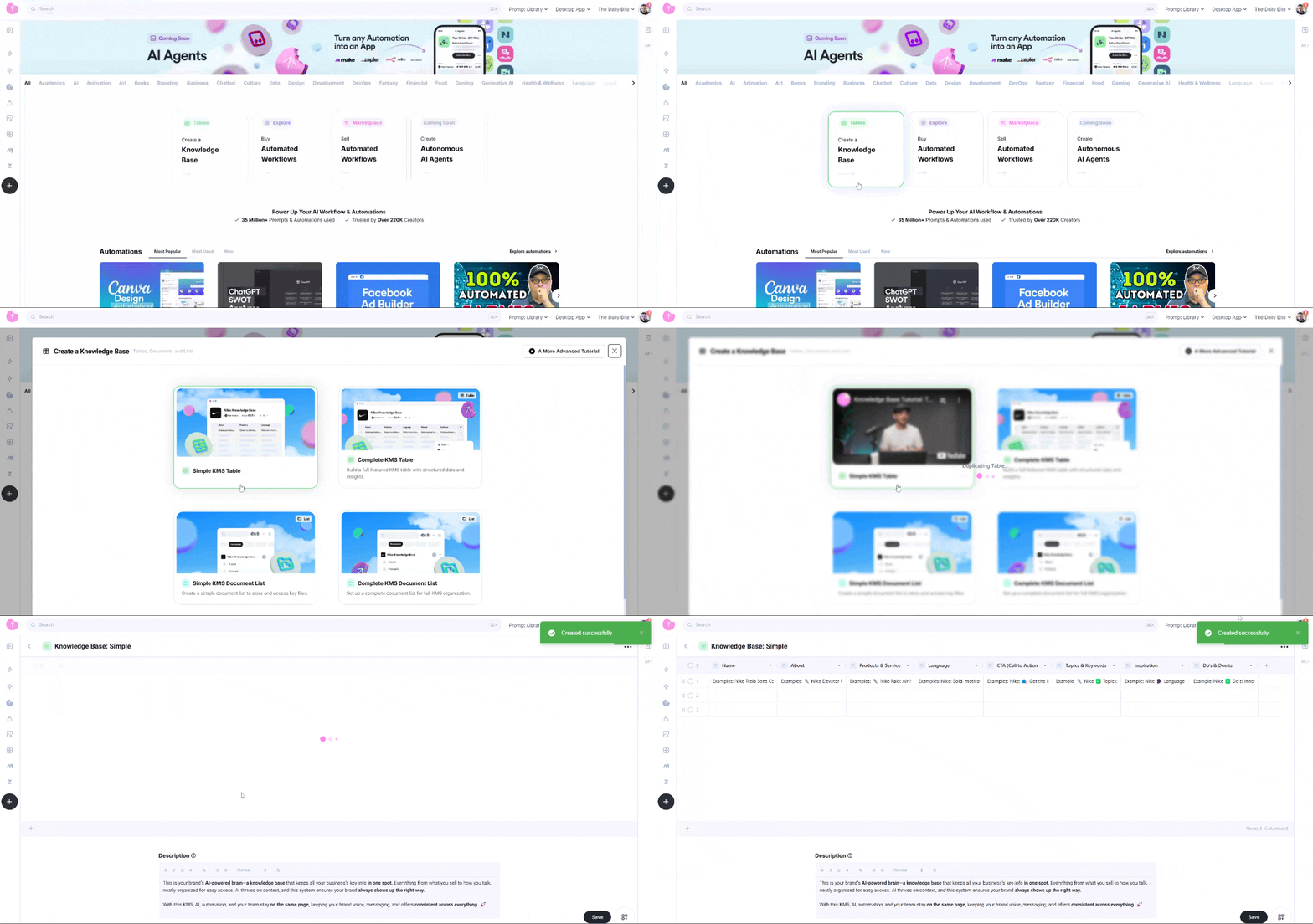
On the Home page, you will find a section displaying the KMS modal in the home list. The first modal, labeled "Create a Knowledge Base", provides an entry point to initialize a KMS within the platform.
Create a Simple KMS Table
- Click on the "Create a Knowledge Base" card" in home page – Opens a dialog with options to set up your KMS.
- Hover over the "Simple KMS Table" option – A short video will appear, explaining how this feature works.
- Click on "Simple KMS Table" – The system will automatically generate a pre-configured table containing an example Knowledge Base.
Customizing Your Simple KMS Table
The Simple KMS Table in Snack Prompt is flexible and can be tailored to various use cases, including:
- Organizing business knowledge (e.g., company mission, product details, best practices).
- Creating structured information for AI models (e.g., ChatGPT, DeepSeek, Gemini).
- Managing customer interactions and support documents.
- Developing automation workflows with AI-powered assistants.
You can:
Add new columns to include details like brand values, customer support scripts, or internal guidelines.
Include detailed descriptions for products and services.
Structure the Knowledge Base per client or business segment, making it a scalable solution for agencies managing multiple brands.
With Snack Prompt’s Knowledge Base Table, you can efficiently structure and manage knowledge, ensuring seamless AI integration and enhanced workflow automation.
For a hands-on demonstration, watch the video below, which explains step by step how to create and use a Knowledge Base Table in Snack Prompt: